Online Door Handle Store

We built a door hardware store from scratch: the catalog structure, a site with a cart and its own admin panel, where the manager runs products and uploads price lists.

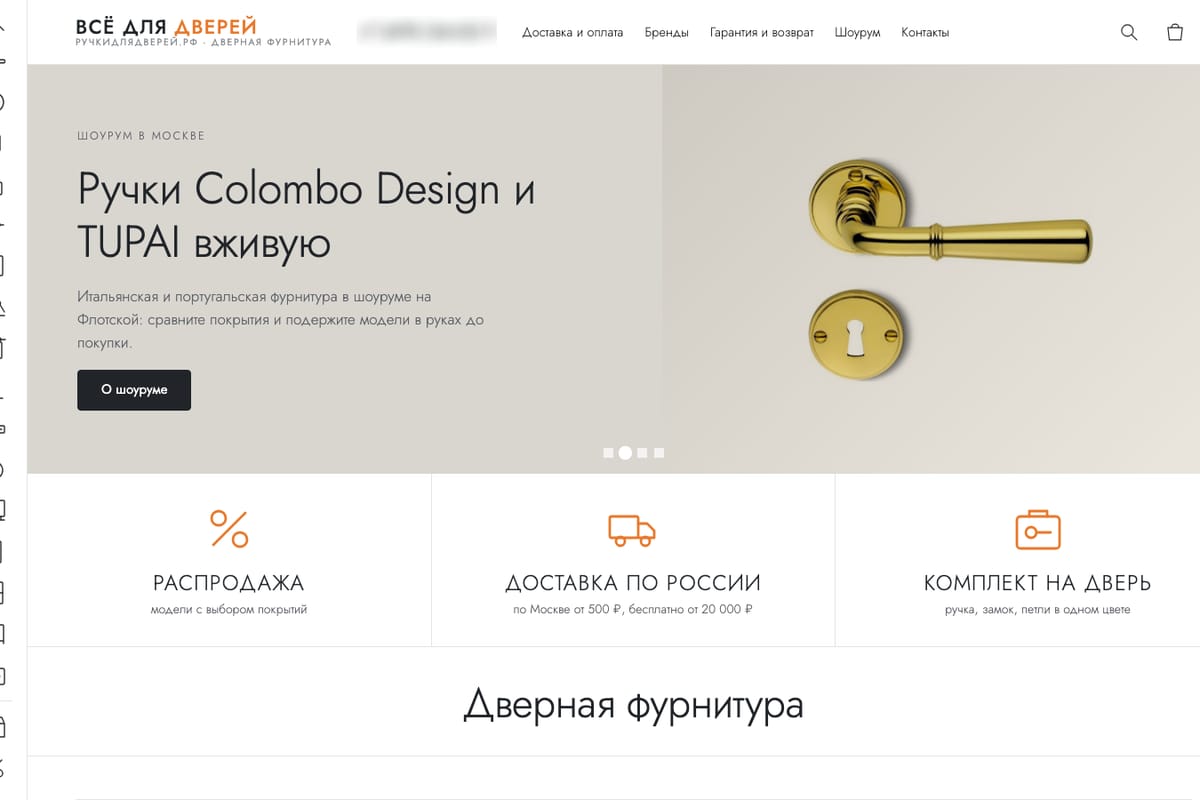
Home page of an online door hardware store
514products in the catalog
products in the catalog
514products in the catalog
catalog sections
123catalog sections
to import 10,000 products from a file
~25 secto import 10,000 products from a file
one photo format for all products
800×800one photo format for all products

A door hardware store: handles, locks, hinges and door stops. The client needed a site where choosing a product is easy, and an admin panel where the manager updates the catalog without a programmer.

The store and its admin panel work in Russian, so the screenshots show the original interface.

What we did

  1. 01

    Structure

    We collected the search queries and organized the catalog into 123 sections.

  2. 02

    Content

    We wrote a parser for the supplier’s website: it pulls in products, specifications and photos.

  3. 03

    Site

    A catalog with filters, product pages, a cart and checkout.

  4. 04

    Admin panel

    Products, sections, orders and price list import in one place.

The site

Catalog: brands and sections with photos
Product page: photo, price, finish selection

The admin panel

Product list with search and filters by brand and section
Product card: page address, H1, Title and Description
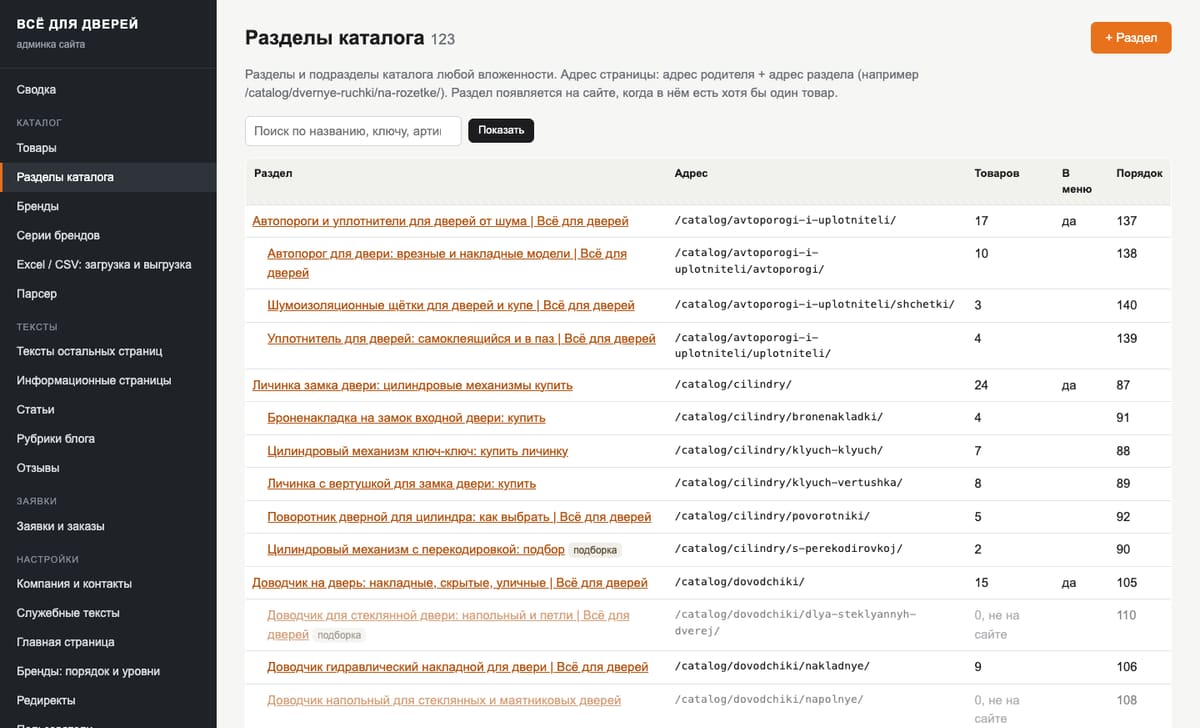
Catalog section tree in the admin panel
Catalog sections: nesting, addresses and number of products
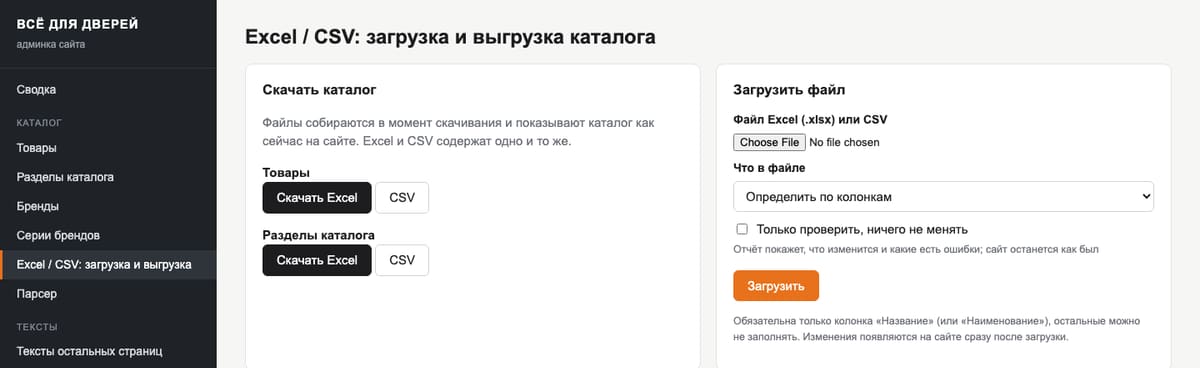
Product import from Excel in the admin panel
Catalog export and import in Excel or CSV

What the admin panel can do:

  • Import from Excel and CSV. The catalog is exported to a table and uploaded back, with a check mode that validates the file without writing anything.
  • Change history. Any change to a product can be rolled back.
  • Orders. They arrive by email and are saved in the admin panel.
  • Redirects. When a product is deleted, it sets a 301 to its section on its own.
  • Access. Each staff member has their own login, and login is protected against password guessing.
  • Page cache. The catalog is served as ready HTML, so the site opens fast.
  • Supplier parser. New arrivals are pulled in without manual entry.

We laid an SEO foundation from the start: meta tags and canonical on every page, product structured data, a sitemap and 800×800 photos on a white background. From there the store can be promoted with ecommerce SEO.

Need a store with its own admin panel? Tell us what you sell, and we will suggest a catalog structure and a set of features.


Discuss your store

Frequently asked questions

Why a custom admin panel and not a ready-made CMS?

The store needed only a catalog, orders and price list uploads. A custom admin panel does exactly that: the manager does not have to deal with extra modules, the site runs fast, and plugin updates do not break anything.

Can products be uploaded from a spreadsheet?

Yes. An Excel or CSV file is uploaded in the admin panel: new products are added and existing ones are updated. A file with 10,000 rows takes about 25 seconds, and a check mode shows errors before anything is written.

How does the manager change a price or a photo?

On the product card. Each finish, for example chrome or matte black, has its own price, availability and photo. Any photo can be uploaded: the site fits it to an 800×800 square on a white background.

What happens to links if a product is deleted or its address changes?

The admin panel sets a 301 redirect itself: to the new address when the address changes, and to the section the product was in when it is deleted. Visitors and search engines do not land on an empty page, and the accumulated link weight is not lost.

What if the manager makes a mistake?

Open the change history. It shows the last 300 edits: who changed what and when, including Excel uploads. Any edit can be undone with one button, and a deleted product comes back the same way.

Can SEO fields be edited without a programmer?

Yes. Products, sections and articles have Title, Description, H1, page address, canonical and a noindex option. If a field is empty, it is built automatically from the name, brand and price.

How do orders arrive?

Orders from the cart and requests from feedback forms land in the requests section of the admin panel and are duplicated by email. A request is saved even if the email does not arrive. The manager agrees payment and delivery with the buyer directly.

Does it connect to accounting software?

Not directly. The store did not need it. A supplier price list or an export from an accounting program only has to be shaped into the table columns and uploaded through Excel.

What else can be managed in the admin panel?

Articles in the "Guides and tips" section, delivery, payment and warranty pages, reviews linked to a product, homepage slides and contacts. Contacts change at once in the header, the footer and on the Contacts page.

How many staff can work in the admin panel?

As many as needed, each with their own login and password. The change history shows who edited what. After a series of wrong passwords, login is blocked for 15 minutes, which protects against guessing.

Get a free express audit

  • A review of your website or its readiness for AI search
  • A list of the problems that keep it from bringing leads
  • A plan for the first steps
  • A cost estimate after the review, not a price list

Audit request